¶ Overview
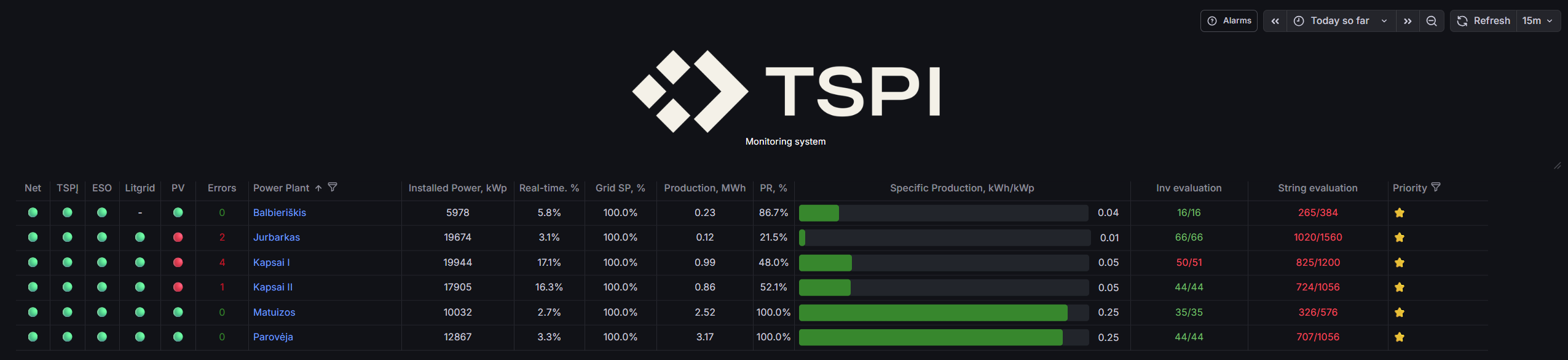
The Main page lists all monitored power plants in a single, simplified table so you can assess fleet health at a glance. Use the filter to narrow the list (including by Priority) and click a plant name (link) to open that plant’s detailed view and controls. A top menu bar provides quick access to global alarms across the entire fleet.
¶ Filtering by priority & generation type
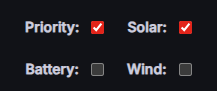
Use the header filters to reduce the fleet list to the sites that matter right now. You can toggle Priority filtering on/off and select one generation type to focus the table on plants that contain that source.
¶ How the filters work
- Priority: switch on to filter the list to priority-tagged plants (starred). Switch off to show all plants again.
-
Generation type: select Solar, Battery, or Wind to filter the table to plants that include that source.
Only one generation type should be selected at a time. - Click Refresh after changing filters/time range to reload values for the selected window.
Note: When a generation type is selected, the table adapts to show the most relevant parameters for that source (while hiding unrelated ones).
¶ What changes in the table
- Solar selected — shows PV-relevant KPIs (e.g., PV output/availability/performance indicators) for faster PV triage.
- Wind selected — shows wind-relevant KPIs (e.g., wind output/availability indicators) for wind-focused fleet review.
- Battery selected — shows battery-relevant KPIs (e.g., Battery setpoint, capacity, SoC, and other BESS telemetry) so you can quickly see charging/discharging context.
Tip: Combine Priority = ON with a generation type filter to quickly surface high-priority sites for that domain (e.g., priority BESS sites when investigating SoC or dispatch issues).
¶ What this page shows
- Status lights — quick connectivity/health indicators (e.g., Net, TSPI, ESO, Litgrid, PV).
- Errors — count of active inverter/plant errors.
- Power Plant — the plant name (click to open the plant’s detailed dashboard).
- Installed Power, kWp — nameplate DC capacity.
- Real-time, % — instantaneous output as a fraction of capacity.
- Grid SP, % — current active power setpoint as a percentage.
- Production, MWh — energy produced during the selected time window.
- PR, % — performance ratio for rapid comparison.
- Specific Production, kWh/kWp — progress bar with value label for quick benchmarking.
- Evaluation (working inverters) — ratio of operating inverters to total, e.g., 16/16. Helps spot offline or blocked devices at a glance.
- String evaluation — string performance based on deviation thresholds; shown as in-spec/total strings (e.g., 265/384) with color cues for faster triage.
- Priority — star indicator for triage; use it to separate objects by priority and filter or sort accordingly.
Values follow the current time range from the time-picker (e.g., Today, Yesterday). Click Refresh to update.
¶ How to use this page
- Pick a time range via the time-picker (e.g., Today) and press Refresh.
- Optionally filter by Priority and/or select a generation type (Solar / Battery / Wind) to focus the list and columns.
- Scan status lights and live KPIs (real-time %, grid SP %, production, PR, specific production).
- Check evaluations:
- Evaluation — low operating/total counts signal inverter outages.
- String evaluation — low in-spec/total counts indicate strings deviating from expected performance.
- Drill down by clicking a plant name to open that plant’s detailed pages for monitoring and control.
- Check alarms using the Alarms button in the header to view fleet-wide alarms in one place.
Tip: Sort by String evaluation or Evaluation (then by Priority) to surface underperforming strings/inverters and prioritize follow-up.