¶ Overview
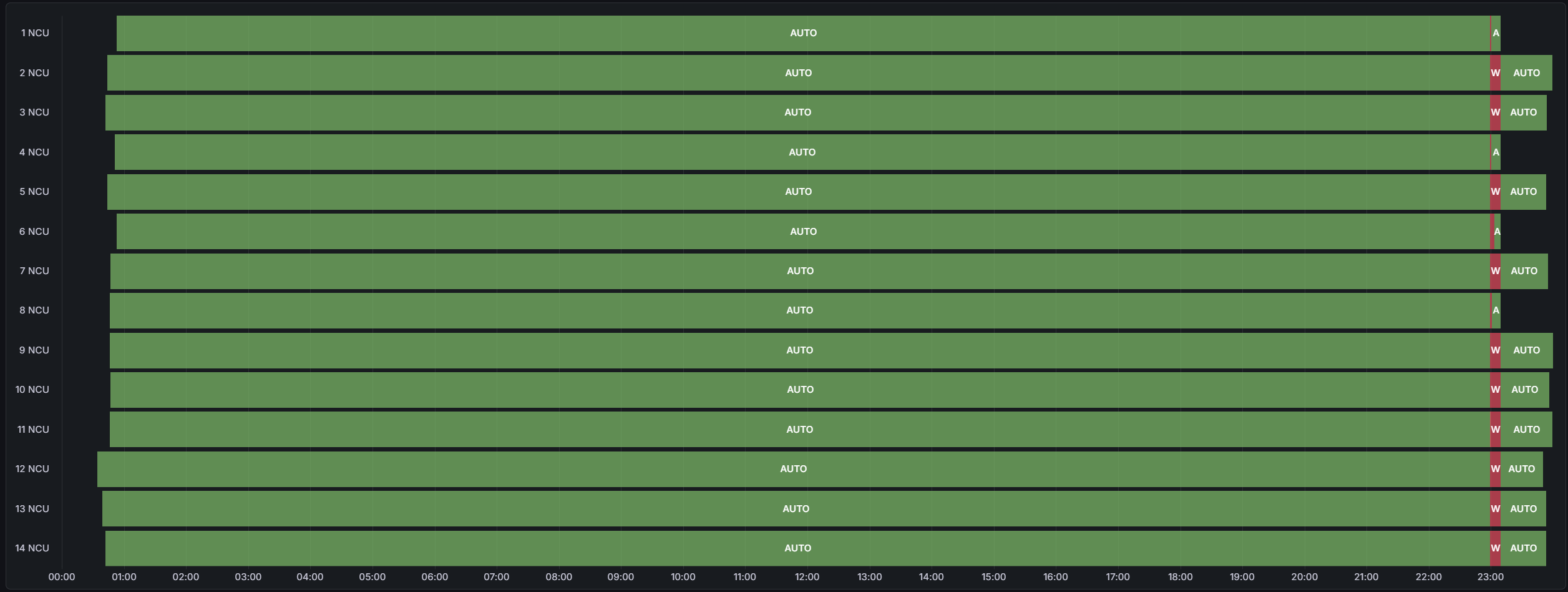
The Tracker Status page visualizes the operational states of all tracker groups (NCUs) over time. It provides a clear state chart showing when each tracker network was in AUTO, MANUAL, WIND, or other modes. This helps operators monitor tracker activity patterns and confirm correct automatic operation throughout the day.
Tip: Use this view to verify tracker autonomy and to detect any extended periods of manual override or offline states.
¶ Functionality & Interaction
The state chart shows horizontal bars for each NCU (Network Control Unit). Each bar represents the tracker’s operational mode over time, allowing quick identification of when and for how long each mode was active.
- Vertical axis: Lists all NCUs (e.g., 1–14) representing different tracker networks across the site.
- Horizontal axis: Represents time within the selected date range.
- Color coding: Each operational mode is represented by a distinct color.
¶ Interacting with the Chart
Users can explore the chart interactively to analyze how long each state lasted and when transitions occurred:
Note: Hover popups show both the tracker’s current operational mode and how long it was maintained during the selected period.
¶ When to Use This View
- Operational validation: Confirm that all trackers were running in AUTO during normal hours.
- Troubleshooting: Detect if any NCUs remained in WIND or OTHER modes unexpectedly.
- Maintenance tracking: Identify periods of manual operation during maintenance tasks.